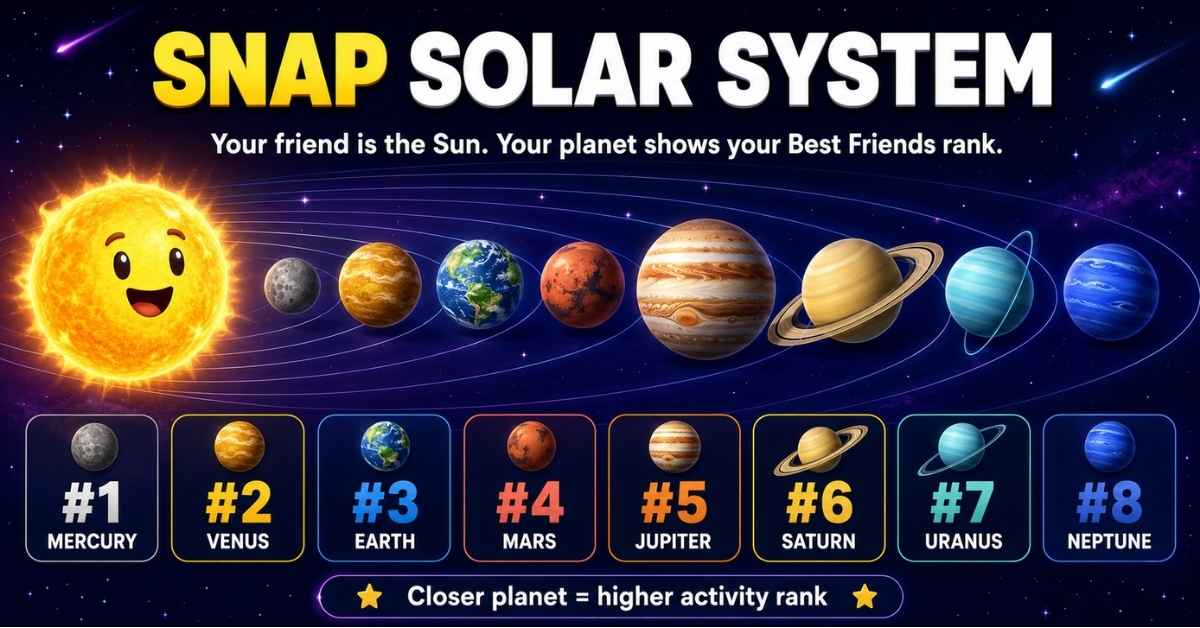
snap solar system is an optional, private Snapchat+ feature that shows your position in another person’s Best Friends activity as a planet. Officially called the Friend Solar System, it uses eight planets from Mercury to Neptune. Mercury represents the first position, while Neptune represents the eighth.
When you open someone’s Friendship Profile, that friend is shown as the Sun, while your Bitmoji appears on a planet. The planet reflects how frequently you communicate through Snapchat compared with that person’s other friends. It does not measure trust, loyalty, emotional closeness, or the complete quality of your real-life friendship.
Snap Solar System in 30 Seconds
| Question | Quick answer |
|---|---|
| What is it? | A private Snapchat+ friendship visualization |
| Who is the Sun? | The friend whose profile you opened |
| Who is the planet? | Your Bitmoji |
| How many planets are there? | Eight |
| What is the closest position? | Mercury, position #1 |
| What is the final position? | Neptune, position #8 |
| Is Snapchat+ required? | Yes |
| Is it enabled automatically? | No, it is off by default for first-time subscribers |
| Is the ranking public? | No |
| Does it measure real friendship? | No, it reflects Snapchat activity |
The most important point is the viewing direction. If you open Alex’s profile and your Bitmoji appears on Venus, Alex is the Sun and you are Venus in Alex’s Friend Solar System.
What the Friend Solar System Actually Shows
The Snapchat Friend Solar System visualizes one friendship at a time. It does not open a complete public chart containing all eight people in someone’s Best Friends list.
Instead, it answers a narrower question:
Where does your Snapchat activity place you within this friend’s Solar System?
Your individual planet position appears after you tap the gold-ringed Best Friends badge on a Friendship Profile. The closer the planet is to the Sun, the higher its ordered position.
The feature does not reveal:
- The identities occupying the other planets
- A complete Best Friends list
- The exact number of Snaps exchanged
- A public numerical score
- Snapchat’s complete ranking formula
- The strength of an offline relationship
- Who someone values most emotionally
Snapchat describes it as a private visual feature rather than a public popularity chart.
Snapchat Planets in Order
The Snapchat planets order follows the real Solar System, beginning with Mercury and ending with Neptune.
| Position | Planet | Visual clues | Meaning |
|---|---|---|---|
| #1 | Mercury | Red planet with red hearts | First position |
| #2 | Venus | Tan planet with pink, yellow and blue hearts | Second position |
| #3 | Earth | Blue-green globe with a moon and red hearts | Third position |
| #4 | Mars | Red planet with blue or purple hearts | Fourth position |
| #5 | Jupiter | Large orange planet with darker stripes | Fifth position |
| #6 | Saturn | Yellow-orange planet with a visible ring | Sixth position |
| #7 | Uranus | Green planet with stars and no hearts | Seventh position |
| #8 | Neptune | Dark blue planet with stars and no hearts | Eighth position |
There are eight Snapchat planets. Pluto is not included, and there is no verified secret ninth position.
Mercury: Position #1
Mercury on Snapchat represents the first position in a friend’s Solar System. It is usually shown as a red planet surrounded by red hearts.
Being Mercury means your friend communicates with you very frequently on Snapchat relative to their other contacts. It does not automatically mean you are their closest friend in real life.
Venus: Position #2
Venus represents the second position. It commonly appears as a light brown or tan planet surrounded by pink, yellow and blue hearts.
The multicolored hearts make Venus easier to distinguish from Mercury and Mars.
Earth: Position #3
Earth represents the third position. It looks similar to the real Earth, with blue water, green land and a small moon. Red hearts may appear around the Friendmoji.
The visible moon is the fastest way to identify Earth.
Mars: Position #4
Mars represents the fourth position. It is red like Mercury, which is why users often confuse the two.
Mercury has red hearts, while Mars is more commonly accompanied by blue or purple hearts and stars.
Jupiter: Position #5
Jupiter represents the fifth position. Look for a large reddish-orange planet with dark stripes or marbling.
It generally does not have the heart-heavy design used for the inner Snapchat planets.
Saturn: Position #6
Saturn represents the sixth position. Its large ring makes it the easiest Snapchat planet to recognize.
The planet usually appears yellow or orange with stars around it.
Uranus: Position #7
Uranus represents the seventh position. It normally appears green with stars and no surrounding hearts.
A Uranus ranking still means you are within the eight positions included in the Friend Solar System.
Neptune: Position #8
Neptune represents the eighth and final position. It is typically dark blue with stars and no hearts.
Being Neptune does not mean a person dislikes you. It only places your recent Snapchat communication in the eighth position relative to their other qualifying friends.
Who Is the Sun When You Check Snapchat Planets?
This is the most misunderstood part of the Snap Solar System.
When you open another person’s Friendship Profile:
- That friend is the Sun
- Your Bitmoji appears on a planet
- Your planet shows your position in their Friend Solar System
Suppose you open Mia’s profile and see your Bitmoji on Mars. Mia is the Sun, and you occupy the fourth position in Mia’s Solar System.
This does not necessarily tell you where Mia appears in your own activity. Planet positions can be different in each direction.
For example, Jordan could be your Mercury because you communicate with Jordan more than anyone else. You might be Jordan’s Mars because Jordan interacts more frequently with three other people.
Best Friends Badge, Friends Badge and Gold Ring
Snapchat’s current support material focuses on a Best Friends badge with a gold ring. Tapping the badge reveals the relevant planet animation when the Friend Solar System is available.
Older articles may also mention separate Best Friends and Friends badges. Because Snapchat changes its interface, the wording and badge presentation may vary by app version, account or rollout.
A gold ring without a visible planet can have several possible causes:
- Friend Solar System is still disabled.
- The Snapchat+ subscription has not synchronized.
- The application needs updating.
- The profile or Bitmoji has not loaded properly.
- The friendship position recently changed.
- Snapchat is experiencing a temporary display problem.
Do not assume that a missing planet proves you were removed from someone’s Best Friends list.
How Snapchat Decides Planet Positions
Snapchat confirms that Best Friends are based on the people users Snap and Chat with most over a rolling period. That underlying activity determines the ordered positions visualized through planets.
However, Snapchat has not publicly disclosed:
- Exact ranking percentages
- The precise weight of Snaps versus Chats
- A guaranteed daily update time
- A required number of messages for Mercury
- A fixed 7-day, 14-day or 30-day calculation window
- Whether every Story view or call contributes
- A guaranteed technique for improving a planet position
| Ranking claim | Status |
|---|---|
| Snaps influence Best Friends | Confirmed |
| Chats influence Best Friends | Confirmed |
| The list updates regularly | Confirmed |
| Mercury corresponds to the first position | Confirmed |
| Neptune corresponds to the eighth position | Confirmed |
| Story replies have a published weight | Not confirmed |
| Profile views improve a planet | Not confirmed |
| Six-month Streaks guarantee Mercury | Not confirmed |
| Rankings update at the same time daily | Not confirmed |
Articles assigning exact interaction percentages to every planet are presenting estimates or assumptions—not Snapchat’s published algorithm.
Why Your Snapchat Planet Changed
A Snapchat planet can change because the Best Friends system is dynamic. The position compares your communication with someone against that person’s activity with other friends.
Common reasons include:
- You exchanged fewer Snaps or Chats.
- Another friend became more active.
- A previously quiet conversation became active again.
- Snapchat recalculated the Best Friends list.
- Your app displayed old information before refreshing.
- The feature changed after an application update.
A position can move even if your own behavior remains relatively consistent. If other friendships become more active, your relative place may change.
That is why moving from Venus to Earth—or from Mercury to Mars—does not automatically mean someone intentionally replaced you.
How to Enable Snap Solar System
The Friend Solar System is off by default for first-time Snapchat+ subscribers. Follow these steps to enable it:
- Open the Snapchat app.
- Tap your Bitmoji or profile icon.
- Open the Snapchat+ membership card.
- Find Friend Solar System in the feature list.
- Turn the toggle on.
- Open a friend’s Friendship Profile.
- Tap the gold-ringed Best Friends badge.
Avoid outdated instructions telling you to activate planets through Discover or Snap Map. The current feature is managed through the Snapchat+ membership screen.
How to Turn Snapchat Planets Off
If the ranking feels distracting or uncomfortable:
- Open your Snapchat profile.
- Tap the Snapchat+ membership card.
- Find Friend Solar System.
- Turn the toggle off.
Disabling the feature does not:
- Cancel Snapchat+
- Delete friends
- Remove Chats or Memories
- End Snapstreaks
- Delete the underlying Best Friends list
- Disable unrelated Snapchat+ features
It simply turns off the planetary visualization.
Why Snapchat Planets Are Not Showing
If you subscribed to Snapchat+ but cannot see planets, work through these checks in order.
1. Confirm the Feature Is Enabled
The most common issue is the opt-in requirement. Open the Snapchat+ feature-management page and confirm that Friend Solar System is switched on.
2. Verify Your Snapchat+ Subscription
Check whether your subscription is active through the original billing channel. Restart Snapchat after subscribing so the membership features can synchronize.
3. Update the Application
Open the Apple App Store or Google Play Store and install any available Snapchat update. An outdated version may display old badges or fail to load newer Snapchat+ features.
4. Restart Snapchat
Fully close and reopen the app. If that fails, restart the phone before trying more disruptive fixes.
5. Check the Friendship Profile
Make sure you are opening the correct profile and tapping the relevant badge. Allow time for the animation and Bitmoji assets to load.
6. Clear Snapchat’s Cache
Temporary files can interfere with feature loading. Use Snapchat’s built-in cache controls. Clearing temporary cache should not delete saved Memories, but always read the confirmation message before proceeding.
7. Contact Snapchat Support
Contact official support if:
- Your subscription is active but no Snapchat+ features appear.
- The Friend Solar System toggle is missing.
- Snapchat repeatedly crashes.
- You have a billing problem.
- Planets remain unavailable after updating and restarting.
Do not give your login credentials to websites or social-media accounts promising to unlock Snapchat+ features.
Is Snapchat Solar System Private?
Friend Solar System is designed as a private feature. It does not expose a complete public Best Friends list or show every person occupying another user’s planets.
Someone checking a Friendship Profile sees an individual position, not the identities of all eight friends.
Does Snapchat Notify Someone When You Check?
Snapchat does not prominently document a notification for opening the Friend Solar System badge. In normal use, checking an individual planet does not appear to send a notification to the friend.
However, application behavior can change. A responsible guide should distinguish between current observed behavior and a permanent official guarantee.
Can Friends See Your Full Solar System?
No. Friends cannot use this feature to open a complete list showing everyone in your Friend Solar System. The individual view is designed to provide friendship context without revealing a public ranking board.
Friend Solar System Versus Other Friendship Features
| Feature | What it shows | Snapchat+ required? |
|---|---|---|
| Friend Solar System | Individual planet position | Yes |
| Friend Emojis | Friendship categories and milestones | No |
| Snapstreaks | Consecutive days exchanging Snaps | No |
| Extended Best Friends List | Current and upcoming Best Friends | Yes |
| Pin #1 Best Friend | A privately selected BFF shortcut | Yes |
| Mutually Pinned BFF | Both users privately pin each other | Yes |
Pinning someone as your #1 Best Friend is not the same as earning a Mercury position through Snapchat activity. Unless Snapchat explicitly connects the systems, do not assume that pinning automatically changes planet placement.
Snapchat also notes that My AI can appear in Best Friends if a user Snaps and Chats with it frequently. That does not necessarily mean My AI will appear as an ordinary friendship planet.
How Much Does Snapchat+ Cost?
There is no single worldwide Snapchat+ price. The amount can vary by:
- Country
- Device
- Apple App Store or Google Play
- Monthly or annual billing
- Account eligibility
- Promotional offers
Some competitors still quote $3.99 per month, but this dated figure should not be treated as the universal 2026 price. Check the Snapchat+ screen inside your own account for the exact amount you will be charged.
Can You Access Snapchat Planets for Free?
Depending on availability, legitimate options may include:
- A Snapchat+ free trial
- A Snapchat+ Buddy Pass
- A gift subscription
- A Friends and Family Plan
Avoid modified Snapchat apps, unofficial downloads and websites promising free premium access. They may compromise your account or violate Snapchat’s terms.
LEARN MORE: PlayHop Com Review
Is Snapchat+ Worth Buying for Friend Solar System?
| Your goal | Recommendation |
|---|---|
| Check one friendship position | Use a legitimate trial or Buddy Pass if available |
| Use several Snapchat+ features regularly | A subscription may offer broader value |
| Find proof that a friend values you | Do not rely on an app ranking |
| Compare a partner’s friendships | Avoid using planets as relationship evidence |
| Feature causes anxiety | Keep it disabled |
| Only need Friend Emojis and Streaks | Free Snapchat may be sufficient |
Other Snapchat+ features may include Extended Best Friends, Story Rewatch tools, custom app icons, chat wallpapers, notification options and additional Streak features. Evaluate the complete package rather than subscribing only to check one planet.
Why Snapchat Made Solar System Off by Default
In April 2024, Snap acknowledged that the feature could produce both positive and negative feelings. While some users enjoyed discovering they were close to someone, others felt rejected or anxious after seeing a lower position.
Snap reported at that time that less than 0.25% of its community used the feature daily on average, but the emotional concerns were significant enough to change the default setting.
Friend Solar System is now optional so users who want friendship insights can enable it, while those who find rankings uncomfortable do not have to see them.
A Low Planet Is Not a Relationship Verdict
The Snap Solar System can create powerful emotional reactions because it turns communication into a visible hierarchy. Mercury can feel validating, while Uranus or Neptune can feel like rejection.
But the system cannot measure:
- Trust
- Loyalty
- Shared history
- Emotional support
- Offline conversations
- Time spent together
- Family relationships
- Personal circumstances
- Communication outside Snapchat
A close real-life friend who rarely uses Snapchat may rank below someone who sends several casual Snaps every day.
Treat the feature as an activity visualization, not a judgment of your value. If checking it becomes repetitive, stressful or damaging to a relationship, turning it off is a healthy and practical choice.
LEARN MORE: Magfusehub Com
Common Snapchat Planet Myths
| Myth | Reality |
|---|---|
| Mercury is automatically your closest real-life friend | It reflects Snapchat activity |
| Neptune means someone dislikes you | It represents the eighth included position |
| Both people always rank each other identically | Positions can be different |
| Long Streaks guarantee Mercury | Snapchat provides no such guarantee |
| Profile views improve your ranking | Not officially confirmed |
| Friends can see the complete Solar System | Only an individual position is shown |
| Snapchat planets are free | Friend Solar System requires Snapchat+ |
| You must cancel Snapchat+ to hide planets | The feature has its own toggle |
| Pluto is a secret ninth planet | The system contains eight planets |
| Exact ranking percentages are public | Snapchat has not released them |
Final Takeaway
The Snap Solar System is a private Snapchat+ visualization of friendship activity. When viewing a friend’s profile, the friend is the Sun and your Bitmoji appears on a planet. Mercury corresponds to position #1, while Neptune corresponds to position #8.
The system reflects how frequently people Snap and Chat over time. It does not reveal a full Best Friends list, publish an exact interaction score, or measure the complete strength of a real relationship.
Use it for curiosity, not certainty. If the feature causes confusion or anxiety, you can turn it off without canceling Snapchat+.
Frequently Asked Questions
What is the Snap Solar System?
It is an optional Snapchat+ feature that displays your position in a friend’s interaction-based Solar System as a planet.
What is the Snapchat planets order?
The order is Mercury, Venus, Earth, Mars, Jupiter, Saturn, Uranus and Neptune, corresponding to positions #1 through #8.
Who is the Sun in Snapchat Friend Solar System?
The friend whose Friendship Profile you are viewing appears as the Sun. Your Bitmoji appears on the planet.
What does Mercury mean on Snapchat?
Mercury corresponds to the first position in the Friend Solar System.
What does Neptune mean on Snapchat?
Neptune corresponds to the eighth and final position. It does not mean the person dislikes you.
Can two friends have different planet positions?
Yes. Someone can be Mercury in your Solar System while you occupy a different position in theirs.
Why did my Snapchat planet change?
Planet positions can change as Snap and Chat patterns shift or as other friendships become more active.
Do Streaks affect Snapchat planets?
Streaks demonstrate regular Snap activity, but Snapchat has not published an exact Streak weight or guaranteed ranking effect.
Do profile views affect Snapchat planets?
Snapchat has not officially confirmed profile views as a Friend Solar System ranking factor.
Does Snapchat notify someone when you check their planet?
No notification is normally observed when opening the planet view, although Snapchat does not prominently publish a permanent guarantee about this behavior.
Do both people need Snapchat+?
The person viewing the Friend Solar System needs Snapchat+. Snapchat’s official explanation does not state that the friend must also subscribe simply to occupy a position.
Can someone see my complete Best Friends list?
No. The Friend Solar System displays an individual planet position, not the identities of everyone in your Best Friends list.
Why do I have a gold ring but no planet?
The feature may be disabled, the subscription may still be synchronizing, or the app may need updating or restarting.
Can I turn off planets without canceling Snapchat+?
Yes. Open the Snapchat+ membership card and switch off Friend Solar System.
Is there a ninth Snapchat planet?
No. Snapchat Friend Solar System uses eight planets from Mercury through Neptune.