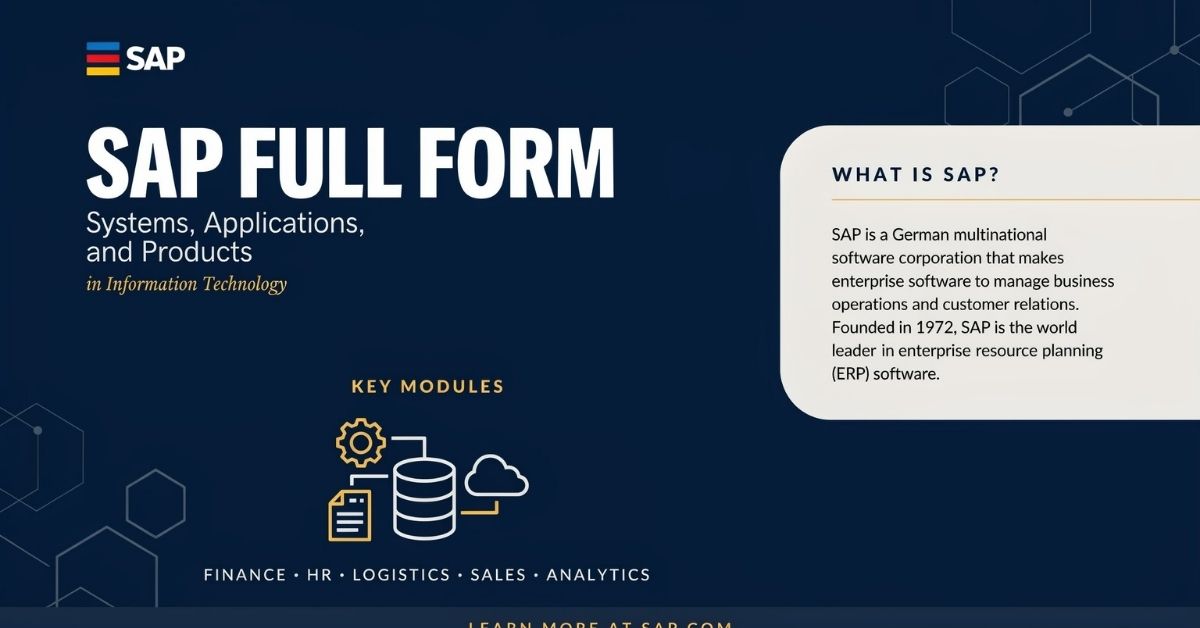
SAP full form is Systems, Applications, and Products in Data Processing. It is also the name of one of the world’s leading enterprise software companies, known for developing powerful Enterprise Resource Planning (ERP) solutions that help organizations manage everything from finance, human resources, sales, procurement, manufacturing, inventory, and supply chains within a single integrated system. Whether you’re a student, job seeker, business owner, or IT professional, understanding SAP software is essential because it powers the operations of thousands of organizations worldwide.
If you’ve ever searched for “what is SAP,” “SAP meaning,” “SAP ERP,” or “SAP full form in computer,” you’re not alone. Many people know the acronym but struggle to understand what SAP actually does and why companies invest millions in it. The truth is that SAP is far more than just software—it’s a complete business management ecosystem that enables organizations to make faster decisions, automate routine tasks, and improve collaboration across departments.
In this comprehensive guide, you’ll learn the SAP full form, its history, how ERP software works, why businesses rely on SAP, the industries that use it, and the foundation you’ll need before exploring SAP modules, SAP S/4HANA, certifications, and career opportunities.
Quick Answer: SAP stands for Systems, Applications, and Products in Data Processing. It is a globally recognized ERP (Enterprise Resource Planning) platform that integrates core business processes into one centralized system, allowing companies to operate more efficiently and make informed decisions using real-time data.
What Is the Full Form of SAP?
SAP Full Form Explained
The SAP full form is:
S – Systems A – Applications P – Products
Together, SAP represents Systems, Applications, and Products in Data Processing.
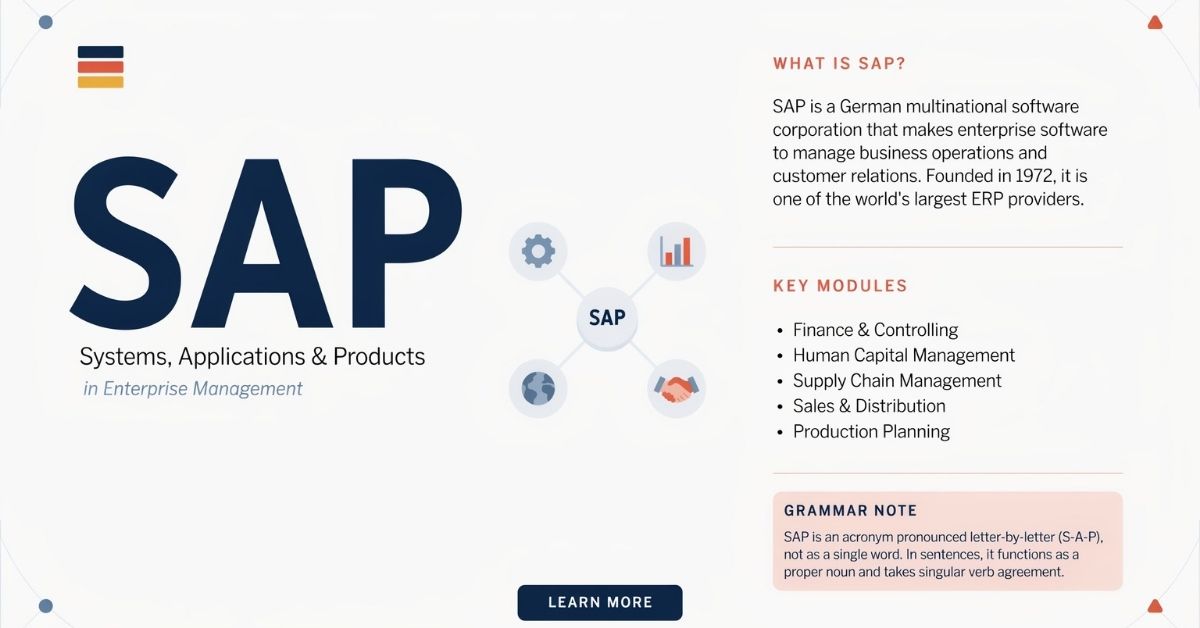
The name dates back to the company’s origins in Germany. It comes from the German phrase “Systemanalyse Programmentwicklung,” which translates to Systems Analysis and Program Development. As SAP expanded internationally, the English version—Systems, Applications, and Products in Data Processing—became the globally recognized expansion of the acronym.
Today, when people refer to SAP, they may be talking about both:
- SAP SE, the multinational software company headquartered in Walldorf, Germany, and
- The broad family of SAP enterprise software solutions, including SAP ERP, SAP S/4HANA, SAP Business One, SAP SuccessFactors, and many other business applications.
This distinction is important because the term “SAP” represents both a company and an ecosystem of technologies that support modern businesses.
What Does SAP Mean in Simple Words?
In simple terms, SAP is software that helps businesses manage their daily operations from one centralized platform.
Instead of using separate applications for accounting, inventory, payroll, sales, purchasing, customer management, and reporting, SAP combines all these functions into one integrated system.
Imagine running a retail store without SAP:
- The sales team uses one application.
- The warehouse maintains inventory in another.
- Finance records transactions separately.
- HR manages employee data in yet another system.
Because these systems don’t communicate effectively, employees waste time entering the same information multiple times, errors increase, and managers struggle to see the complete picture.
Now imagine using SAP ERP software.
Every department works with the same data. When a customer places an order:
- Inventory updates automatically.
- Finance records the transaction instantly.
- Procurement can reorder stock when inventory reaches a predefined level.
- Managers see real-time reports without waiting for manual updates.
That’s why SAP has become synonymous with efficient business management and digital transformation.
What Is SAP and Why Is It So Important?
Understanding what SAP is requires more than knowing its full form. Businesses don’t invest in SAP simply because it’s popular—they use it because it solves complex operational challenges.
SAP acts as the central nervous system of an organization, connecting departments, people, and processes through a shared database. This enables companies to operate with greater speed, accuracy, and transparency.
Understanding SAP Without Technical Jargon
Think of SAP as the operating system for a business.
Just as your smartphone connects apps like messaging, photos, maps, and email into one device, SAP connects essential business functions into one unified platform.
Instead of isolated departments working independently, SAP enables them to collaborate using shared information.
For example:
- The sales department creates a customer order.
- The warehouse immediately receives a picking request.
- Inventory management adjusts stock levels automatically.
- The finance team generates invoices and records revenue.
- Management dashboards update in real time.
No department has to re-enter the same information because SAP keeps everything synchronized.
This integrated approach reduces errors, saves time, and supports faster decision-making.
How SAP Connects Different Business Departments
One of SAP’s greatest strengths is its ability to integrate multiple business functions.
Finance
Tracks revenue, expenses, budgets, taxes, and financial reporting.
Human Resources
Manages employee records, payroll, recruitment, attendance, and performance.
Sales
Processes customer orders, pricing, invoicing, and customer relationships.
Procurement
Handles supplier management, purchasing, approvals, and vendor payments.
Inventory Management
Monitors stock levels, warehouse movements, and product availability.
Manufacturing
Coordinates production planning, material requirements, scheduling, and quality control.
Because all departments access the same centralized database, information remains consistent across the organization.
A Real-Life Example of SAP in Action
Imagine a company that manufactures office furniture.
A customer places an online order for 100 ergonomic chairs.
Without SAP:
- Sales emails production.
- Production calls the warehouse.
- Inventory updates manually.
- Finance waits for paperwork.
- Purchasing discovers material shortages too late.
The process becomes slow, fragmented, and prone to mistakes.
With SAP ERP:
- The customer order enters the system.
- Inventory availability is checked instantly.
- Production receives an automatic work order.
- Procurement orders additional raw materials if necessary.
- Warehouse staff receive picking instructions.
- Finance prepares the invoice.
- Shipping schedules delivery.
- Executives monitor the entire process through real-time analytics.
Every department works together seamlessly, improving efficiency and customer satisfaction.
What Is ERP and How Does SAP Fit Into It?
Many people searching for “SAP full form” quickly encounter another acronym: ERP.
Understanding ERP is essential because SAP is best known as an Enterprise Resource Planning platform.
ERP Explained in Plain English
ERP stands for Enterprise Resource Planning.
It is software that brings together the major functions of a business into one integrated system.
Rather than storing information in disconnected spreadsheets or separate applications, ERP creates a single source of truth where every department shares accurate, up-to-date information.
This means:
- Sales knows current inventory.
- Finance sees real-time transactions.
- HR accesses employee records.
- Procurement monitors supplier performance.
- Management receives live business insights.
ERP eliminates duplicate work and improves collaboration across the organization.
Why Businesses Need ERP Software
Growing businesses face several common challenges:
- Duplicate data entry
- Communication gaps
- Inventory errors
- Delayed reporting
- Slow decision-making
- Inefficient workflows
- Poor visibility across departments
An ERP system addresses these issues by integrating business processes into one platform.
Companies benefit from:
- Better productivity
- Real-time analytics
- Improved compliance
- Faster reporting
- Workflow automation
- Higher customer satisfaction
- Smarter resource planning
This is why ERP has become a cornerstone of modern digital transformation strategies.
SAP vs. ERP: What’s the Difference?
Many beginners mistakenly think SAP and ERP mean the same thing.
They don’t.
| Feature | ERP | SAP |
| Meaning | Enterprise Resource Planning | A company and its ERP software solutions |
| Purpose | Business management concept | Enterprise software platform implementing ERP |
| Scope | General category | Specific ERP ecosystem |
| Providers | Many vendors | SAP SE |
| Examples | ERP software | SAP ERP, SAP S/4HANA, SAP Business One |
Simply put:
- ERP is the concept.
- SAP is one of the world’s leading ERP providers.
Why SAP Became a Global ERP Leader
Over several decades, SAP has built a reputation for helping organizations manage increasingly complex operations.
Businesses choose SAP because it offers:
- Integrated business processes
- Scalable enterprise solutions
- Cloud ERP capabilities
- Advanced business intelligence
- Real-time analytics
- Artificial Intelligence (AI) integration
- Machine learning features
- Workflow automation
- Global compliance support
- Industry-specific solutions
Today, organizations in manufacturing, retail, healthcare, banking, logistics, telecommunications, energy, government, and many other industries rely on SAP to support mission-critical operations.
Its ability to evolve—from early on-premise ERP systems to modern SAP S/4HANA cloud solutions—has helped it remain one of the most influential names in enterprise software.
A Brief History of SAP
Understanding SAP’s journey provides valuable context for why it has become a dominant force in enterprise software.
Who Founded SAP?
SAP was founded in 1972 by five former IBM engineers:
- Dietmar Hopp
- Hans-Werner Hector
- Hasso Plattner
- Klaus Tschira
- Claus Wellenreuther
Their vision was ambitious yet straightforward: create software that allowed businesses to process information in real time rather than relying on outdated batch-processing systems.
What began as a small startup in Germany has grown into one of the world’s largest enterprise software companies, serving organizations across virtually every major industry.
How SAP Evolved From R/2 to SAP S/4HANA
SAP’s evolution reflects the changing needs of businesses over the past five decades.
SAP R/2
Designed for mainframe computers, R/2 introduced integrated business processing for large enterprises.
SAP R/3
Released in the 1990s, R/3 transformed enterprise software by introducing a client-server architecture that made SAP more flexible and widely accessible.
SAP ERP (ECC)
The SAP ERP Central Component (ECC) expanded functionality with enhanced modules for finance, logistics, procurement, manufacturing, human resources, and customer relationship management.
HANA
It introduced the HANA in-memory database, enabling organizations to process enormous amounts of data much faster than traditional databases.
SAP S/4HANA
Today, SAP S/4HANA represents SAP’s next-generation ERP platform.
Built on the HANA database, it offers:
- Real-time analytics
- Cloud deployment options
- Simplified data models
- Artificial Intelligence integration
- Machine Learning capabilities
- Enhanced user experience through SAP Fiori
- Improved automation
- Better decision-making
Rather than simply upgrading older ERP systems, SAP S/4HANA is designed to support modern, data-driven organizations navigating digital transformation.
Major Milestones That Changed Enterprise Software
SAP’s continuous innovation has influenced how businesses manage operations worldwide.
Some of the most significant milestones include:
| Year | Milestone | Impact |
| 1972 | SAP founded | Introduced integrated business software vision |
| 1979 | SAP R/2 | Enterprise integration for mainframes |
| 1992 | SAP R/3 | Client-server ERP revolution |
| 2004 | SAP NetWeaver | Improved system integration and interoperability |
| 2010 | SAP HANA | In-memory computing transformed data processing |
| 2015 | SAP S/4HANA | Next-generation intelligent ERP platform |
| Today | Cloud ERP, AI, SAP Business Technology Platform (BTP), SAP Fiori | Intelligent enterprise powered by automation, analytics, and cloud innovation |
These milestones have helped SAP remain at the forefront of enterprise software, cloud ERP, business intelligence, and digital transformation, making it a trusted solution for organizations seeking efficiency, scalability, and innovation.
How Does SAP Work?
Understanding how SAP works is much easier when you think of it as a central command center for an organization. Instead of each department maintaining its own disconnected software and spreadsheets, SAP creates a single, integrated platform where information is shared in real time.
Every transaction entered into SAP becomes available—subject to permissions—to the departments that need it. This reduces duplicate work, improves accuracy, and enables faster business decisions.
Whether it’s finance, procurement, sales, manufacturing, inventory management, customer relationship management (CRM), or human resources (HR), everyone works from the same reliable source of information.
The Centralized Database Concept
At the core of every SAP ERP system is a centralized database.
Imagine a company where:
- The sales team records customer orders.
- The warehouse tracks inventory.
- Finance manages invoices.
- HR stores employee information.
- Procurement handles supplier purchases.
Without SAP, each department might maintain its own records, leading to inconsistent data and communication gaps.
With SAP, every department accesses the same database.
For example:
- A sales order immediately updates inventory.
- Finance can generate an invoice automatically.
- Procurement receives alerts when stock reaches a minimum level.
- Managers can view real-time performance dashboards.
This “single source of truth” is one of the biggest reasons organizations adopt Enterprise Resource Planning (ERP) solutions.
How Data Flows Across Departments
One of SAP’s greatest strengths is the seamless flow of information.
Let’s say a customer places an order for 500 laptops.
The process looks like this:
- Sales records the customer order.
- Inventory Management (MM) checks stock availability.
- Production Planning (PP) schedules manufacturing if inventory is insufficient.
- Procurement (MM) orders components from suppliers when required.
- Warehouse Management (EWM) prepares products for shipment.
- Sales & Distribution (SD) arranges delivery.
- Finance (FI) automatically generates the invoice.
- Controlling (CO) analyzes profitability.
- Management dashboards update instantly with real-time analytics.
Each department works independently, yet all remain connected through SAP.
End-to-End Business Process Example
Consider an online furniture company selling office desks.
Without SAP:
- Sales manually emails production.
- Inventory updates happen at the end of the day.
- Purchasing discovers material shortages too late.
- Finance waits for paperwork before invoicing.
- Managers rely on outdated reports.
With SAP S/4HANA, the workflow becomes automated:
Customer Order → Inventory Check → Production Planning → Procurement → Manufacturing → Warehouse → Shipping → Invoice → Payment → Financial Reporting
The result is:
- Faster order fulfillment
- Improved inventory accuracy
- Lower operating costs
- Better customer experience
- Real-time decision-making
This illustrates why SAP is trusted by organizations handling thousands—or even millions—of transactions every day.
Visual Suggestion: Include a flowchart titled “How SAP Connects Every Business Department” to show the order-to-cash process from customer purchase to financial reporting.
Where Is SAP Used?
SAP is not limited to one industry or company size. While it is widely associated with multinational corporations, businesses across many sectors use SAP to improve operational efficiency, ensure compliance, and support growth.
Industries That Depend on SAP
Manufacturing
Manufacturers use SAP to:
- Plan production schedules
- Track raw materials
- Monitor quality control
- Manage factory operations
- Forecast demand
Example: An automobile manufacturer uses SAP to ensure the right parts arrive at the right assembly line at the right time.
Retail and E-commerce
Retail businesses rely on SAP for:
- Inventory management
- Customer orders
- Pricing
- Promotions
- Warehouse operations
- Supply chain management
This helps prevent stock shortages and improves the customer shopping experience.
Healthcare
Hospitals and healthcare organizations use SAP to manage:
- Medical supplies
- Procurement
- Financial reporting
- Human resources
- Regulatory compliance
A centralized system ensures critical resources are available when needed.
Banking and Financial Services
Financial institutions use SAP for:
- Financial planning
- Risk management
- Compliance reporting
- Budgeting
- Audit preparation
Accurate data and real-time reporting are essential in highly regulated industries.
Government and Public Sector
Government agencies implement SAP to improve:
- Budget management
- Procurement
- Payroll
- Public finance
- Asset management
This increases transparency and accountability.
Logistics and Transportation
Logistics companies depend on SAP for:
- Fleet management
- Warehouse operations
- Shipment tracking
- Route optimization
- Inventory control
Energy and Utilities
Utility providers use SAP to manage:
- Infrastructure assets
- Maintenance planning
- Customer billing
- Workforce scheduling
Learn More: Ton or Tonne
Why Large Enterprises Prefer SAP
Large organizations often operate across multiple countries, currencies, languages, and regulations.
SAP helps them:
- Standardize business processes
- Improve collaboration
- Ensure regulatory compliance
- Manage complex supply chains
- Scale operations efficiently
- Gain real-time visibility into global performance
Its flexibility makes it suitable for organizations with thousands of employees and complex business operations.
Can Small Businesses Use SAP?
Yes.
Although SAP has traditionally been associated with large enterprises, it also offers solutions designed specifically for smaller organizations.
Popular options include:
- SAP Business One
- SAP Business ByDesign
These products provide many ERP capabilities without the complexity of enterprise-scale implementations, allowing growing businesses to manage finance, inventory, sales, and purchasing from one platform.
Key SAP Modules Explained for Beginners
One reason SAP is so powerful is its modular architecture.
Instead of forcing every company to use the same features, SAP allows businesses to implement the modules they need while integrating them into one unified system.
SAP Finance (FI)
The Financial Accounting (FI) module manages:
- General ledger
- Accounts payable
- Accounts receivable
- Asset accounting
- Financial reporting
It helps organizations maintain accurate financial records and comply with accounting standards.
SAP Controlling (CO)
The Controlling (CO) module focuses on internal financial management.
Businesses use it for:
- Cost analysis
- Budget planning
- Profitability analysis
- Internal reporting
Together, FI and CO provide a complete financial management solution.
SAP Materials Management (MM)
The Materials Management (MM) module handles:
- Procurement
- Purchasing
- Inventory management
- Vendor management
- Goods receipts
It ensures businesses have the right materials available without overstocking.
SAP Sales and Distribution (SD)
The Sales & Distribution (SD) module manages:
- Customer orders
- Pricing
- Shipping
- Billing
- Returns
It streamlines the entire sales process while improving customer service.
SAP Human Capital Management (HCM)
HCM supports:
- Employee records
- Payroll
- Recruitment
- Attendance
- Performance management
It enables HR teams to manage the employee lifecycle more efficiently.
SAP Production Planning (PP)
Manufacturing companies use PP for:
- Production scheduling
- Capacity planning
- Material requirements planning
- Shop floor control
This helps optimize production while reducing waste.
SAP Customer Relationship Management (CRM)
CRM improves customer interactions by managing:
- Sales opportunities
- Customer service
- Marketing campaigns
- Customer data
It strengthens customer relationships and supports business growth.
SAP Supply Chain Management (SCM)
SCM connects suppliers, manufacturers, warehouses, and customers.
It helps organizations:
- Forecast demand
- Optimize logistics
- Reduce transportation costs
- Improve inventory planning
SAP Business Warehouse (BW)
BW collects and organizes business data for reporting and analytics.
Decision-makers use it to identify trends and measure business performance.
SAP Extended Warehouse Management (EWM)
EWM manages complex warehouse operations, including:
- Receiving
- Storage
- Picking
- Packing
- Shipping
It is particularly valuable for businesses with high-volume warehouse operations.
SAP Modules at a Glance
| Module | Purpose | Typical Users | Business Benefit |
| FI | Financial Accounting | Finance Teams | Accurate financial reporting |
| CO | Cost Control | Management | Better budgeting |
| MM | Procurement & Inventory | Purchasing Teams | Inventory optimization |
| SD | Sales | Sales Teams | Faster order processing |
| HCM | Human Resources | HR Professionals | Efficient workforce management |
| PP | Manufacturing | Production Managers | Better production planning |
| CRM | Customer Management | Sales & Marketing | Improved customer relationships |
| SCM | Supply Chain | Logistics Teams | Optimized operations |
| BW | Analytics | Executives | Data-driven decisions |
| EWM | Warehouse Operations | Warehouse Managers | Improved inventory accuracy |
Modern SAP Products You Should Know
Over the years, SAP has evolved beyond traditional ERP software into a comprehensive ecosystem of cloud-based business solutions.
SAP S/4HANA
SAP S/4HANA is SAP’s flagship next-generation ERP platform.
It offers:
- Real-time analytics
- AI-powered automation
- Cloud deployment
- Simplified data structures
- Improved user experience
- Faster reporting
Many organizations are migrating from SAP ECC to SAP S/4HANA to modernize their operations.
SAP HANA
SAP HANA is an in-memory database that processes massive amounts of information much faster than traditional databases.
This enables:
- Real-time reporting
- Advanced analytics
- Faster application performance
- Better business intelligence
SAP Business One
Designed for small and medium-sized businesses (SMBs), SAP Business One helps companies manage:
- Finance
- Sales
- Purchasing
- Inventory
- Customer relationships
It delivers ERP functionality without enterprise-level complexity.
Business ByDesign
A cloud-based ERP solution built for growing businesses.
It combines:
- Financial management
- Supply chain
- CRM
- Human resources
- Project management
within a single cloud platform.
SuccessFactors
A cloud-based Human Capital Management (HCM) solution.
Organizations use it for:
- Recruitment
- Learning
- Employee experience
- Payroll
- Performance management
SAP Ariba
SAP Ariba simplifies procurement by connecting buyers with suppliers.
It supports:
- Strategic sourcing
- Supplier collaboration
- Contract management
- Purchasing automation
SAP Concur
Concur helps organizations manage:
- Travel bookings
- Expense reporting
- Employee reimbursements
It reduces manual paperwork and improves financial control.
SAP Fiori
SAP Fiori provides a modern, intuitive user interface that makes SAP applications easier to use across desktops, tablets, and mobile devices.
In Business Technology Platform (BTP)
BTP enables organizations to:
- Develop applications
- Integrate systems
- Analyze data
- Use Artificial Intelligence
- Automate workflows
It serves as the innovation platform for many SAP solutions.
What Problems Does SAP Solve?
Businesses adopt SAP because it addresses challenges that become increasingly difficult as organizations grow.
Eliminating Data Silos
Different departments often maintain separate systems, leading to inconsistent information.
SAP centralizes business data, ensuring everyone works from the same reliable source.
Improving Decision-Making
With real-time analytics and business intelligence dashboards, leaders can monitor performance instantly rather than waiting for manual reports.
Automating Repetitive Tasks
SAP automates activities such as:
- Invoice generation
- Purchase approvals
- Inventory updates
- Payroll processing
- Financial reporting
Automation reduces errors and frees employees to focus on higher-value work.
Enhancing Compliance and Reporting
Organizations must comply with financial, tax, and industry regulations.
SAP provides standardized reporting and audit trails that simplify compliance.
Supporting Business Growth
As businesses expand into new markets, SAP scales with them by supporting:
- Multiple currencies
- Multiple languages
- International taxation
- Global supply chains
- Cross-border operations
Real-World Example
A national retail chain struggled with inventory discrepancies across hundreds of stores.
After implementing SAP, it achieved:
- Better stock visibility
- Faster replenishment
- More accurate sales forecasting
- Reduced inventory shortages
- Improved customer satisfaction
This demonstrates how integrated ERP systems can transform everyday business operations.
Benefits and Challenges of Using SAP
Like any enterprise platform, SAP offers significant advantages but also requires planning and commitment for successful implementation.
Major Benefits
- Centralized business data
- Improved operational efficiency
- Real-time reporting and analytics
- Enhanced collaboration across departments
- Greater scalability for growing businesses
- Workflow automation
- Better compliance and governance
- Improved customer service
- Reduced manual errors
- Data-driven decision-making
Common Challenges
- Initial implementation costs
- Employee training requirements
- Change management
- Data migration complexity
- Customization needs
- Integration with legacy systems
How Businesses Overcome These Challenges
Successful organizations typically:
- Define clear implementation goals.
- Invest in employee training.
- Adopt SAP in phases rather than all at once.
- Clean and validate existing data before migration.
- Partner with experienced SAP consultants.
- Continuously monitor and optimize business processes after deployment.
These best practices help maximize the return on investment while minimizing disruption during implementation.
Is Learning SAP Worth It?
The short answer is yes—for many professionals, learning SAP software can open doors to rewarding career opportunities. As organizations continue investing in digital transformation, cloud ERP, and business process automation, the demand for skilled SAP professionals remains strong across multiple industries.
However, success in SAP isn’t just about learning the software. It’s about understanding business processes, ERP concepts, and how technology helps organizations solve real-world challenges.
Why SAP Skills Are in Demand
Businesses want professionals who can:
- Improve operational efficiency
- Analyze business processes
- Configure SAP modules
- Support digital transformation initiatives
- Optimize supply chains
- Manage financial systems
- Enhance HR operations
- Deliver better customer experiences
As companies modernize legacy systems and adopt SAP S/4HANA, demand continues to grow for professionals who understand both business and technology.
Who Should Learn SAP?
SAP is suitable for professionals from many backgrounds.
Students and Fresh Graduates
Learning ERP fundamentals and an entry-level SAP module can strengthen your resume before entering the job market.
Accountants and Finance Professionals
Modules like SAP FI and SAP CO help finance teams manage accounting, budgeting, and financial reporting.
Supply Chain and Logistics Professionals
Knowledge of SAP MM, SAP SCM, and SAP EWM supports procurement, inventory, and warehouse management.
HR Professionals
SAP SuccessFactors and SAP HCM are widely used for recruitment, payroll, and workforce management.
IT Professionals
Developers, administrators, and system analysts can specialize in:
- ABAP
- SAP Basis
- SAP Fiori
- SAP Business Technology Platform (BTP)
- Integration and cloud technologies
Does SAP Require Coding?
One of the biggest misconceptions is that every SAP job requires programming.
The reality is different.
Functional Roles
These roles focus on business processes and usually require little or no coding.
Examples:
- SAP FI Consultant
- SAP MM Consultant
- SAP SD Consultant
- SAP HCM Consultant
Technical Roles
These involve software development, customization, and system integration.
Examples:
- ABAP Developer
- SAP Basis Administrator
- SAP Integration Consultant
- SAP Fiori Developer
This means you can build a successful SAP career even if you don’t have a programming background.
See More: Below or Bellow
Popular SAP Career Paths
SAP offers diverse career opportunities depending on your interests and skills.
| Role | Primary Focus | Key Skills |
| SAP Functional Consultant | Business process optimization | ERP knowledge, communication |
| SAP Technical Consultant | System customization | Programming, integration |
| SAP ABAP Developer | Application development | ABAP, debugging |
| SAP Basis Administrator | System administration | Installation, security, performance |
| SAP Security Consultant | Access control | Governance, compliance |
| SAP Data Analyst | Business intelligence | Analytics, reporting, SAP BW |
The best career path depends on whether you enjoy business problem-solving, technical development, or data analysis.
How to Start Learning SAP
If you’re new to SAP, following a structured learning path is far more effective than jumping straight into advanced modules.
Step 1: Learn ERP Fundamentals
Understand:
- What Enterprise Resource Planning (ERP) is
- How business processes work
- Why organizations use integrated software
Without this foundation, SAP can seem overwhelming.
Step 2: Choose the Right SAP Module
Select a module based on your career goals.
Examples:
- Finance → SAP FI
- Procurement → SAP MM
- Sales → SAP SD
- Human Resources → SAP HCM
- Manufacturing → SAP PP
- Development → ABAP
Avoid trying to learn every module at once.
Step 3: Practice Through Hands-On Learning
Theory alone isn’t enough.
Practice by:
- Exploring SAP training systems
- Completing guided exercises
- Simulating business scenarios
- Working on sample projects
Practical experience builds confidence and reinforces concepts.
Step 4: Explore Certifications
Professional certifications can validate your knowledge and demonstrate commitment to employers.
Choose certifications that align with your career path rather than collecting multiple credentials without practical experience.
Step 5: Build Real-World Experience
Employers value problem-solving ability as much as technical knowledge.
You can gain experience by:
- Participating in internships
- Contributing to implementation projects
- Practicing business process mapping
- Working with ERP simulations
- Building a portfolio of learning projects
Beginner-to-Professional SAP Learning Roadmap
| Stage | Goal |
| Beginner | Learn ERP concepts and SAP basics |
| Foundation | Choose one SAP module |
| Intermediate | Practice business processes |
| Advanced | Learn implementation and configuration |
| Professional | Gain project experience and continuous learning |
SAP vs. Other ERP Systems
Choosing an ERP platform depends on business size, industry, budget, and operational needs.
| Feature | SAP | Oracle ERP | Microsoft Dynamics 365 | Odoo |
| Enterprise Focus | Excellent | Excellent | Very Good | Good |
| Cloud Capabilities | Excellent | Excellent | Excellent | Good |
| Manufacturing | Excellent | Excellent | Good | Good |
| Customization | High | High | Medium | High |
| Ease of Learning | Moderate | Moderate | Easier | Easier |
| Best For | Large enterprises & growing businesses | Large enterprises | Mid-sized businesses | Small businesses |
SAP stands out because of its deep industry expertise, broad ecosystem, and scalability across global organizations.
Common Myths About SAP
Many misconceptions discourage people from learning SAP or create unrealistic expectations.
Myth 1: SAP Is Only for Programmers
Reality: Many SAP consultants work in functional roles that focus on business processes rather than coding.
Myth 2: SAP Is Only for Large Companies
Reality: Solutions like SAP Business One and SAP Business ByDesign are designed specifically for small and medium-sized businesses.
Myth 3: SAP Is Impossible to Learn
Reality: SAP has a learning curve, but understanding ERP concepts and focusing on one module at a time makes the process manageable.
Myth 4: SAP Replaces Employees
Reality: SAP automates repetitive tasks while enabling employees to focus on strategic work and decision-making.
Myth 5: Every SAP Job Requires Coding
Reality: Functional consultants, business analysts, and many project roles rely primarily on business knowledge rather than programming.
Common Mistakes Beginners Make When Learning SAP
Avoiding these mistakes can save time and accelerate your progress.
Trying to Learn Every Module
Start with one specialization instead of attempting to master the entire SAP ecosystem.
Ignoring Business Processes
SAP supports business operations. Understanding workflows is just as important as learning the software.
Memorizing Instead of Practicing
Hands-on experience is far more valuable than simply reading documentation.
Focusing Only on Certification
Certifications help, but employers also look for practical problem-solving skills and project experience.
Skipping ERP Fundamentals
Learning SAP without understanding Enterprise Resource Planning often leads to confusion.
Frequently Asked Questions
What is the full form of SAP?
SAP full form is Systems, Applications, and Products in Data Processing. It is also the name of a global company that develops ERP software for managing business operations.
Is SAP a company or software?
Both. SAP SE is the company, while SAP ERP, SAP S/4HANA, SAP Business One, and other products are software solutions developed by the company.
What is ERP in SAP?
ERP (Enterprise Resource Planning) is a system that integrates core business functions—such as finance, procurement, inventory, sales, manufacturing, and HR—into a single platform.
Why is SAP called SAP?
The acronym comes from Systems, Applications, and Products in Data Processing, derived from the company’s original German name.
Which industries use SAP?
SAP is widely used in:
- Manufacturing
- Retail
- Healthcare
- Banking
- Government
- Logistics
- Energy
- Telecommunications
- Education
- Consumer goods
Is SAP difficult to learn?
SAP has a learning curve, but beginners who understand ERP fundamentals and focus on one module at a time generally find it manageable.
Does SAP require programming knowledge?
Not always. Functional SAP roles often require little or no coding, while technical roles involve programming and system development.
Which SAP module is best for beginners?
The best module depends on your career goals:
- Finance → SAP FI
- Sales → SAP SD
- Procurement → SAP MM
- HR → SAP HCM
- Manufacturing → SAP PP
Is SAP still in demand in 2026?
Yes. Organizations continue investing in SAP S/4HANA, cloud ERP, AI-powered automation, and business process optimization, creating ongoing demand for skilled professionals.
What is the difference between SAP ERP and SAP S/4HANA?
SAP ERP (ECC) is the earlier generation of SAP’s enterprise software, while SAP S/4HANA is the modern intelligent ERP platform built on the high-performance SAP HANA database, offering faster analytics, simplified processes, and cloud capabilities.
Can small businesses use SAP?
Absolutely. SAP Business One and SAP Business ByDesign provide ERP solutions tailored for small and medium-sized businesses.
Conclusion
Understanding the SAP full form is only the beginning. Systems, Applications, and Products in Data Processing represents far more than an acronym—it reflects a comprehensive ecosystem that has transformed the way organizations manage their operations. By integrating finance, human resources, procurement, manufacturing, sales, inventory, customer relationship management, and supply chain processes into a single platform, SAP ERP enables businesses to improve efficiency, make data-driven decisions, and adapt to changing market demands.
Whether you’re a student exploring career options, a professional preparing for an interview, or a business leader evaluating enterprise software, understanding what SAP is, how ERP works, and why organizations rely on SAP S/4HANA and other SAP solutions provides a strong foundation for future learning. As technology continues to evolve with Artificial Intelligence (AI), Machine Learning, cloud ERP, real-time analytics, and workflow automation, SAP remains at the forefront of enterprise innovation.
If you’re planning to start your SAP journey, begin by mastering ERP fundamentals, select a module aligned with your career goals, practice real-world business scenarios, and continue building practical experience. With the right approach, SAP can become a valuable skill that supports long-term professional growth and helps businesses operate more intelligently in an increasingly digital world.